AI Workflow Automation: How Businesses Eliminate Repetitive Work Without Hiring More Staff

Every growing business reaches a point where the answer to increasing workload stops being "hire another person" and starts being "find a better way to manage the work that's accumulating."
That point arrives quietly. A team that used to handle its workflow comfortably starts staying later. Approvals that used to take a day start taking three because the approver is one person managing five times the requests they used to. Information that used to live in one spreadsheet now lives in six, updated inconsistently by whoever remembered to do it that week. None of this looks like a crisis. It looks like normal growing pains — right up until the operational friction starts limiting how fast the business can actually grow.
AI workflow automation addresses this specific problem: the accumulation of coordination work — moving information between systems, chasing approvals, updating records, sending reminders, routing tasks to the right person — that keeps a business running but adds no direct value to customers, and that scales in volume faster than most businesses can scale their operational headcount to match.
The distinction from simply adding more automation tools matters here. A business can accumulate a dozen point solutions — one for approvals, one for reporting, one for CRM updates, one for scheduling — and still experience the same coordination friction, because the tools don't talk to each other and someone still has to manually bridge the gaps between them. AI workflow automation, done properly, is not about adding tools. It's about connecting people, systems, and processes into workflows that execute routine coordination automatically, while keeping employees focused on the work that actually requires their judgment.
This guide covers how AI workflow automation works, where it delivers the strongest value across departments, how to build a workflow strategy that scales with the business rather than adding new complexity, and how it differs from — and connects to — the broader business process automation framework.
—AI business process automation
What AI Workflow Automation Actually Is
Workflow automation has existed in some form for decades — the evolution from manual, email-driven coordination to rule-based automated workflows was well underway before AI entered the picture. Understanding what AI specifically adds requires being clear about each stage of that evolution.
Manual workflows rely entirely on people to notice that a task needs doing, remember to do it, and communicate its completion to whoever needs to know. This is how most small teams operate by default, and it works — until volume exceeds what a team can track reliably in their heads and email inboxes.
Rule-based workflow automation — the generation of tools that includes traditional workflow platforms and RPA — executes predefined sequences when specific triggers occur. If a form is submitted, route it to a specific person. If an invoice arrives, create a task. This is reliable and fast, but entirely inflexible: it handles the exact scenario it was configured for and breaks or requires manual intervention for anything outside that scenario.
AI-powered workflow automation adds a layer of judgment to this sequence. Rather than requiring every possible scenario to be explicitly configured in advance, AI workflows can interpret the content of a document to determine how it should be routed, assess the urgency of a request based on its language rather than a rigid category field, recommend the most appropriate next step based on patterns learned from thousands of similar cases, and adapt their behaviour as they encounter new variations rather than breaking on anything unanticipated.
The right mental model: AI functions as a workflow coordinator, not simply another automation tool bolted onto existing processes. It's the difference between a system that executes fixed instructions and one that can reasonably decide what to do next when the situation doesn't match a pre-written rule exactly.
Why Workflow Automation Has Become a Business Priority
Several structural pressures have converged to make workflow automation a priority rather than a nice-to-have for growing businesses.
Workloads are growing faster than headcount. Revenue growth, customer growth, and transaction volume growth in most businesses now outpace the rate at which businesses can or want to hire proportionally. The gap has to be closed by something — and increasingly, that something is automated coordination rather than additional staff.
Software platform proliferation has created new coordination burden. The average mid-sized business now runs a CRM, a project management tool, an accounting platform, a communication tool, an HR system, and often several department-specific tools — each holding a piece of the operational picture, none of them talking to each other without manual bridging. This fragmentation is itself a cost that workflow automation directly addresses.
Manual approvals create bottlenecks that scale badly. An approval process that works fine at ten requests per week becomes a genuine operational drag at a hundred requests per week if it still depends on one person manually reviewing and responding to each one via email.
Information silos slow decision-making. When the information needed to make a decision is scattered across systems that don't communicate, decisions take longer than the underlying complexity warrants — not because the decision is hard, but because gathering the information to make it is.
Customer response time expectations have compressed. Whatever a business's customers or clients are used to elsewhere, that expectation transfers to every interaction — including internal processes that indirectly affect how fast a business can respond externally.
Workflow automation addresses each of these directly: improving operational efficiency by removing manual coordination steps, improving employee productivity by removing tasks that don't require judgment, improving process consistency by applying the same logic every time rather than depending on whoever happens to be handling a request that day, and improving scalability by allowing transaction volume to grow without proportional headcount growth.
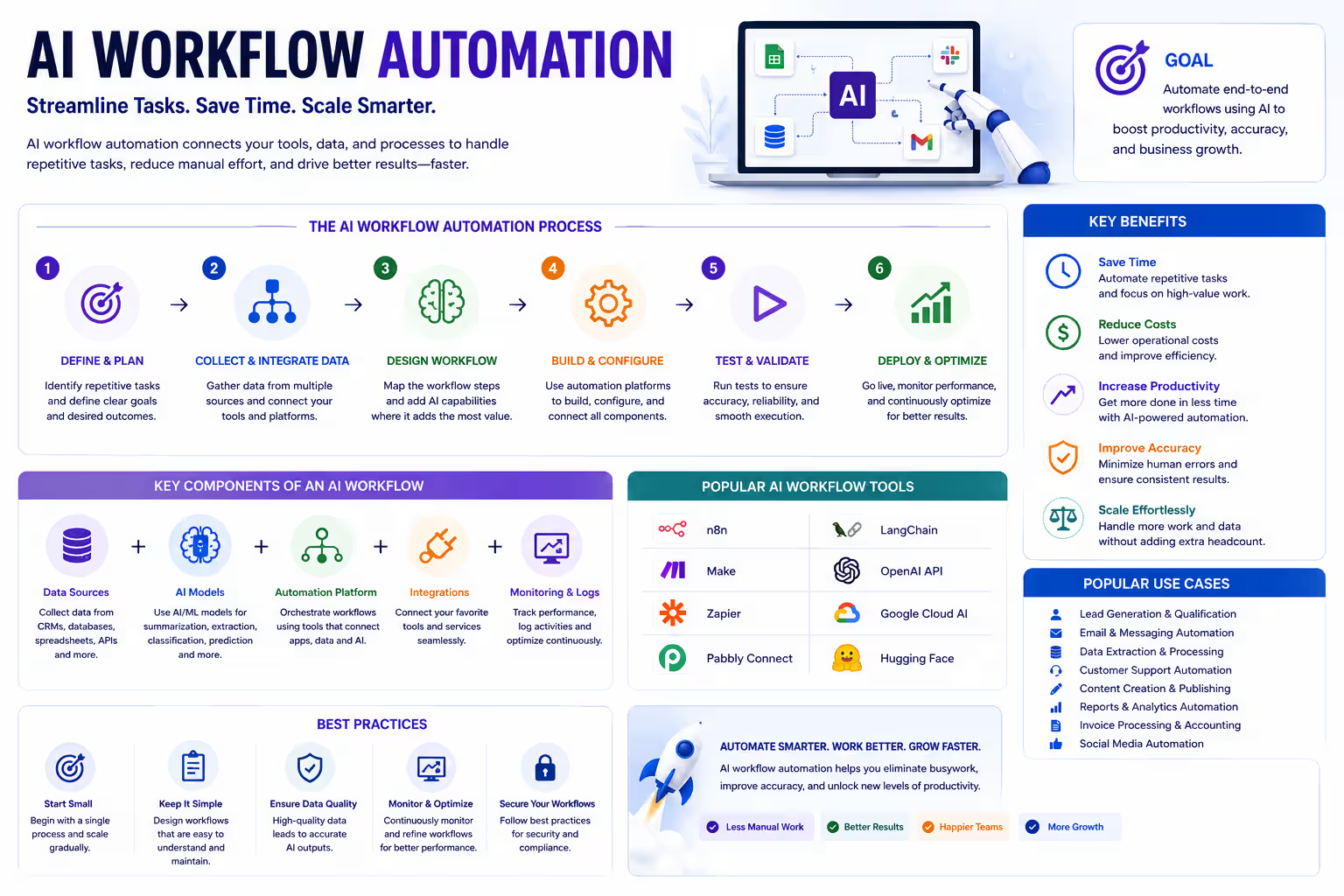
AI Workflow Automation - Figure
How AI Workflows Differ From Traditional Automation
Dimension | Traditional Workflow Automation | AI Workflow Automation |
|---|---|---|
Rule handling | Fixed, predefined rules only | Context-aware — interprets situations beyond explicit rules |
Flexibility | Limited — breaks on unanticipated scenarios | Adaptive — handles variation within its trained scope |
Document handling | Requires structured input (forms, defined fields) | Can interpret unstructured documents and extract relevant information |
Routing logic | Based on fixed criteria (category, sender, keyword) | Based on inferred intent, urgency, and content analysis |
Decision support | None — executes only what it's told | Provides recommendations based on learned patterns |
Predictability | Highly predictable — same input always produces same output | Probabilistic — output reflects learned patterns, not fixed rules |
Setup requirement | Requires explicit configuration for every scenario | Requires training data and calibration, less exhaustive scenario mapping |
Maintenance | Breaks when processes change, requires reconfiguration | Adapts more gracefully to process variation, though still needs periodic review |
The practical implication of this comparison: traditional automation remains the right tool for genuinely stable, well-defined, high-volume processes with minimal variation — it's faster to configure, more predictable, and doesn't require the data and calibration investment that AI workflows need. AI workflow automation earns its complexity when the process involves judgment, unstructured information, or enough variation that a rule-based system would require an impractical number of exceptions to handle reliably.
AI Workflow Automation vs Business Process Automation — What's the Difference?
Given that this post follows directly from the cluster's business process automation guide, it's worth being explicit about how the two relate, because the terms are frequently used interchangeably and the overlap is real.
Business process automation is the broader strategic frame — identifying which end-to-end processes across a business should be redesigned and automated, prioritising them by ROI, and defining what success looks like at the process level. It's the "what and why."
AI workflow automation is the operational and technical layer that executes that strategy — the specific mechanics of how tasks move between systems and people, how approvals route, how information gets extracted and passed along, and how AI makes the judgment calls that connect these steps intelligently rather than rigidly. It's the "how."
In practice, a business process automation initiative for, say, the customer onboarding process, is implemented through a workflow — the specific sequence of triggers, routing logic, document handling, and system integrations that make the redesigned process actually run. This post focuses on that operational layer: how AI-powered workflows are built, where they deliver value, and how to implement them well.
Business Processes That Benefit Most From AI Workflow Automation
Not every process is a good automation candidate, and attempting to automate processes that don't share the right characteristics produces engineering effort without proportional return.
The processes worth prioritizing typically involve:
High repetition — tasks that recur frequently enough that the cumulative time investment justifies the setup cost of automating them. A process that happens twice a year rarely justifies automation investment regardless of how tedious it is each time.
Multiple handoffs — processes where work passes between several people or systems before completion. Each handoff is a point where AI-driven routing and status tracking removes delay and ambiguity about where a task currently stands.
Standard approvals — processes with defined approval criteria, even if those criteria involve some judgment. Approval routing based on request type, value, and requester can be automated even when the actual approval decision retains human judgment.
Document-heavy operations — processes where the bottleneck is reading, extracting, and acting on information contained in documents. This is precisely where AI's ability to interpret unstructured content adds capability that traditional automation lacks.
Frequent customer interaction — processes where response speed and consistency directly affect customer experience, and where the volume makes manual handling of every interaction impractical at scale.
Real-World Workflow Automation Across Departments
Sales Workflows
Sales workflows benefit from AI automation across lead routing, CRM updates, proposal request handling, meeting scheduling, and follow-up reminders — removing the coordination overhead that consumes selling time without directly advancing a deal. The full breakdown of AI applications specifically within the sales function — lead qualification, forecasting, and AI sales agents — is covered in depth in a dedicated guide within this series.
Marketing Workflows
Marketing workflows carry a particularly high coordination burden because campaigns typically involve multiple approval stages, multiple content formats, and multiple distribution channels that all need to stay synchronized. AI workflow automation here covers campaign approval routing, lead nurturing sequence triggers, email sequence management, content publishing coordination, and reporting automation that pulls performance data across platforms without manual compilation.
For businesses running paid acquisition campaigns — including high-volume PPC operations — workflow automation extends into performance monitoring and optimisation triggers: automated alerts when campaign performance shifts outside expected ranges, automated reporting that consolidates data across ad platforms, and workflow-driven escalation when a campaign requires strategic attention rather than routine adjustment. This is the same operational discipline that underpins scalable programmatic SEO execution — content and technical workflows structured so they run consistently across dozens or hundreds of pages without proportional manual oversight for each one.
The full picture of AI applications specifically within marketing — lead nurturing intelligence, content workflows, and campaign optimisation — is covered in a dedicated guide within this series.
Customer Support Workflows
Customer support workflows benefit from AI-driven ticket routing based on content and urgency, priority detection that surfaces genuinely urgent issues ahead of routine ones, escalation workflows that route complex issues to the right specialist automatically, knowledge base suggestion systems that surface relevant documentation to agents mid-conversation, and automated customer notifications that keep customers informed of status without requiring manual updates. The complete framework for AI in customer support — including triage design and response quality management — is covered in a dedicated guide within this series.
HR Workflows
HR processes are highly standardised and document-heavy, making them strong automation candidates. Leave approval workflows route requests based on policy and remaining entitlement without manual calculation. Employee onboarding workflows sequence the documentation, system access, and introductory tasks that new hires need without requiring HR to manually track a checklist for each person. Policy request handling and HR documentation retrieval can be automated through AI systems trained on internal policy documentation, resolving common queries without HR team involvement.
Finance Workflows
Finance workflows benefit significantly from AI automation given their high volume, structured nature, and document-heavy character. Invoice approval workflows route based on amount, vendor, and department without manual assignment. Expense processing workflows check submissions against policy and auto-approve compliant items. Vendor onboarding workflows sequence the documentation, verification, and system setup that new vendor relationships require. Financial reporting workflows pull data across systems on a schedule and generate first-draft reports for review rather than manual compilation.
AI Agents and Intelligent Workflow Orchestration
The workflow examples above describe AI executing and routing specific tasks within a defined process. AI agents represent a further layer — systems capable of coordinating across multiple workflows, making sequential decisions, and managing outcomes rather than just executing individual steps.
The distinction matters practically. A workflow automation rule routes an approval request to the right person based on its type and value. An approval agent goes further — it can assess whether a request is likely to be approved based on historical patterns, flag requests that deviate from typical parameters for additional scrutiny, follow up automatically if an approval stalls beyond a normal timeframe, and escalate appropriately if the assigned approver is unavailable.
Document assistants don't just route documents based on type — they read the content, extract the relevant data points, verify completeness against requirements, and flag documents that need human review because they contain ambiguity or unusual terms.
CRM assistants, as covered in the sales automation guide, proactively maintain data quality rather than just executing update triggers — flagging inconsistencies, surfacing stale records, and prompting contextual action rather than generic reminders.
Operations coordinators manage cross-functional workflows that span multiple departments — a new client onboarding process, for example, that requires sales handoff, legal review, finance setup, and operations provisioning — tracking the overall process status, identifying which stage is creating delay, and coordinating the handoffs between departments without requiring a human project manager to manually chase each stage.
Reporting assistants compile data across systems, identify significant trends or anomalies worth flagging, draft narrative summaries, and distribute reports on schedule — extending beyond simple data pulls into genuine synthesis and interpretation.
The organisations getting the most value from multi-agent workflows are those where agents collaborate within defined boundaries — an operations coordinator agent triggering a document assistant to verify a contract, which then triggers an approval agent to route the verified document for sign-off — creating an orchestrated sequence that would previously have required a human project manager to manually coordinate across each step.
AI Workflow Automation in Daily Business Operations
Understanding how this operates in practice, rather than in the abstract, helps clarify what "AI workflow automation" actually looks like across a working day in a business that has implemented it well.
Morning: AI systems have processed overnight activity — new leads, support tickets, approval requests, document submissions — and prioritised them based on urgency and importance rather than simple chronological order. Team members start the day with a prioritised task list rather than an undifferentiated inbox.
Throughout the day: Approval requests route automatically to the right person with the relevant context attached. CRM records update in real time as calls happen and emails are sent, without requiring manual entry. Meeting summaries generate automatically, with action items extracted and assigned. Reports that would previously require manual compilation are available on demand, pulling current data rather than requiring someone to build them from scratch.
End of day: Performance summaries consolidate the day's activity across relevant metrics. Outstanding actions — approvals pending beyond their normal turnaround, tickets awaiting response, deals without recent activity — are surfaced for attention rather than requiring someone to manually audit for what's been missed. Workflow insights identify patterns worth addressing — a specific approval type consistently taking longer than expected, a particular ticket category showing rising volume — that inform process improvement decisions.
This is not a vision of a fully automated business with no human involvement. It's a description of a business where the coordination overhead — the moving of information, the routing of tasks, the tracking of status — happens automatically, and human attention concentrates on the decisions, exceptions, and relationships that actually require it.
Workflow Automation Maturity Model
Understanding where a business currently sits helps clarify what the next practical step should be, rather than attempting to implement every capability simultaneously.
Maturity Stage | Characteristics | Typical Indicators |
|---|---|---|
Stage 1 — Manual | Coordination happens via email, spreadsheets, and memory | Frequent dropped tasks, inconsistent process execution, high administrative time |
Stage 2 — Rule-Based | Basic workflow tools handle defined, stable processes | Reliable for routine tasks, breaks frequently on exceptions, requires ongoing reconfiguration |
Stage 3 — AI-Assisted | AI handles document interpretation and intelligent routing within specific workflows | Noticeable time savings in targeted processes, still departmental rather than integrated |
Stage 4 — Orchestrated | AI agents coordinate across multiple workflows and departments | Cross-functional processes run with minimal manual coordination, data flows consistently across systems |
Most businesses beginning an AI workflow automation initiative sit at Stage 1 or early Stage 2. The realistic and valuable next step is Stage 3 — targeted AI-assisted automation of the highest-friction processes — rather than attempting to leap directly to Stage 4 orchestration before the underlying workflows and data quality can support it.
Building an AI Workflow Strategy
Phase 1 — Map Existing Workflows
Document how work currently moves through each process being considered for automation — every step, every handoff, every system involved, and every decision point. This mapping frequently reveals redundant steps or unnecessary approvals that should be eliminated before automation, not preserved within it.
Phase 2 — Identify Bottlenecks
Within each mapped workflow, pinpoint specifically where delays accumulate, where errors most frequently occur, and where manual coordination is consuming disproportionate time relative to the complexity of the decision involved.
Phase 3 — Prioritize Repetitive Work
Rank automation candidates by frequency, current time cost, and strategic impact — following the same prioritisation logic that applies across every automation initiative in this cluster. The processes with the highest volume and the highest current time cost typically produce the fastest, most measurable returns.
Phase 4 — Deploy Automation Gradually
Implement the highest-priority workflow first, in a controlled scope, and measure its performance against the baseline established in Phase 1 before expanding to additional workflows. Gradual deployment allows genuine learning from each implementation to inform the next, rather than deploying multiple untested workflows simultaneously and struggling to diagnose which one is producing which result.
Phase 5 — Optimize Continuously Using Workflow Analytics
Workflow automation is not a one-time implementation. The data generated by automated workflows — completion times, exception rates, routing accuracy — should inform ongoing refinement. Workflows that were correctly configured at launch often benefit from adjustment as business processes evolve or as more data reveals patterns that weren't visible initially.
Gradual, phased implementation consistently outperforms attempting comprehensive automation immediately — both because it builds organisational confidence and because it surfaces the practical lessons that make each subsequent workflow implementation more effective.
Measuring Workflow Automation ROI
The KPIs that demonstrate workflow automation value span immediate efficiency gains and broader operational impact:
Hours saved — the most direct measure, calculated as the time a process previously required minus the time it requires with automation, multiplied by frequency.
Process completion time — the end-to-end duration from initiation to completion, which typically improves significantly as manual handoff delays are removed.
Employee productivity — the redirection of time from coordination tasks to higher-value work, measurable through time allocation studies or simply through capacity analysis (how much more volume the same team can now handle).
Approval turnaround — a specific and easily measured metric that improves consistently with automated routing and status tracking.
Customer response time — for customer-facing workflows, this metric connects directly to experience and retention outcomes.
Error reduction — automated workflows that remove manual data entry and manual handoffs typically show measurable reduction in the errors that those manual steps previously introduced.
Operational costs — the aggregate financial impact of the above, translated into cost savings or capacity gained.
The strategic ROI extends beyond these direct measurements. A business that automates its onboarding workflow doesn't just save the administrative hours involved — it gains the ability to onboard more clients or employees simultaneously without proportional increases in operational staff, which is a scalability gain that compounds as the business grows. Measuring only labour cost savings understates the full value of workflow automation investment.
AI Governance and Human Oversight
Workflow automation that removes human involvement from every step is not the goal — appropriate oversight, calibrated to the stakes of each workflow, is what makes automation trustworthy at scale.
— 25 AI Implementation Challenges in Web Development
Human approvals should remain at genuinely consequential decision points. Automating the routing and preparation of an approval request is valuable. Removing human judgment from the approval decision itself — particularly for high-value, high-risk, or precedent-setting decisions — trades efficiency for risk that most businesses shouldn't accept.
Exception handling needs defined escalation paths. AI workflows will encounter situations outside their trained scope. A well-designed workflow has a clear path for these exceptions to reach human attention promptly, rather than either blocking silently or making an unreliable automated decision in an unfamiliar situation.
Security and access control apply to AI workflow systems as they do to any system with access to business data. AI agents that can read documents, update records, and trigger actions across systems represent an access point that requires the same security discipline — access controls, audit logging, and permission review — as any other system with that level of reach.
Compliance and data privacy requirements apply throughout automated workflows, particularly where personal data moves between systems or where automated decisions affect individuals — employees, customers, or job applicants. Workflow design should incorporate these requirements from the outset rather than retrofitting them after implementation.
The principle worth reinforcing: automation done well should improve control and visibility, not reduce it. A well-designed automated workflow provides more consistent audit trails, clearer status visibility, and more reliable escalation than the manual, ad hoc processes it replaces — properly governed automation is more accountable than the informal manual coordination it's replacing, not less.
Common Workflow Automation Mistakes
Automating broken workflows. A process with unnecessary steps, redundant approvals, or unclear ownership becomes a faster, more consistently broken process when automated without first being redesigned. Mapping and fixing should precede automating.
Too many disconnected automation tools. Point solutions that don't share data with each other recreate the coordination problem they were meant to solve — just with more software licences. Integration should be a selection criterion for any new workflow tool, not an afterthought.
Poor documentation. Workflows that exist only in the configuration of an automation platform, with no accessible documentation of what they do and why, become fragile as the people who built them move on and the institutional knowledge of how they work disappears.
Ignoring employee adoption. Workflow automation changes how people work day to day. Implementations that don't invest in explaining the change, training on the new process, and addressing legitimate concerns about role change produce low adoption regardless of how well the technology functions.
Lack of monitoring. Deployed workflows need ongoing performance review. A workflow that was performing well at launch can degrade silently as underlying data or business conditions shift — without monitoring, this degradation goes unnoticed until it produces a visible failure.
Trying to automate everything immediately. The businesses that struggle most with workflow automation are typically those that attempted comprehensive automation across every department simultaneously, rather than building organisational capability and confidence through a sequence of successful, smaller implementations.
US vs UK Workflow Automation Trends
United States:
Enterprise automation initiatives are typically larger in scope, often spanning multiple departments simultaneously, supported by larger implementation budgets and dedicated revenue operations or business operations functions
AI copilots embedded within existing enterprise software (Microsoft Copilot, Salesforce Einstein, Google Workspace AI features) are a common entry point, allowing workflow automation to begin without a standalone implementation project
Cross-platform integration is a mature discipline in the US enterprise market, with established integration platforms (Zapier, Workato, Make) and internal integration teams supporting complex multi-system workflows
Revenue operations culture treats workflow automation as core infrastructure rather than a discrete IT project, embedding it into how the business operates rather than treating it as a bolt-on capability
United Kingdom:
SME adoption is strong and often begins with a single high-friction process rather than a comprehensive automation programme — reflecting both smaller typical implementation budgets and a more incremental adoption culture
Operational efficiency is the most commonly cited driver, with UK businesses frequently framing workflow automation investment in terms of cost control and capacity rather than growth enablement
Compliance-driven implementation is more prominent — workflows involving personal data, financial processes, or regulated industry requirements are designed with UK GDPR and sector-specific compliance considerations built in from the outset
Incremental adoption — implementing one workflow thoroughly, measuring results, then expanding — is the more common pattern than the larger simultaneous rollouts more typical of US enterprise implementations
Case Study: Workflow Orchestration for a Professional Services Company
The Situation
A professional services company facing familiar operational strain: manual approval processes that depended on email chains and personal follow-up, task management scattered across email rather than a centralised system, reporting that lagged behind actual business activity by days or weeks, CRM records that were inconsistently updated depending on which team member handled a given interaction, and internal communication that was slow enough to visibly affect client-facing response times.
Before workflow automation:
Metric | Value |
|---|---|
Process completion time | 5.4 days |
Administrative hours/month | 275 hrs |
Approval turnaround | 31 hours |
Employee productivity | Baseline |
Process error rate | Baseline |
Strategy Implemented
The implementation followed the phased framework — mapping existing workflows first, then prioritising by bottleneck severity and frequency.
AI workflow orchestration was implemented for the client onboarding process — the highest-friction cross-departmental workflow identified in the mapping phase, involving sales handoff, contract review, account setup, and initial delivery scheduling.
Approval automation replaced the email-based approval process with automated routing based on request type and value, including automatic escalation for approvals exceeding normal turnaround time.
CRM synchronization connected the previously disconnected systems the sales and delivery teams were using, ensuring account information updated consistently across both rather than requiring manual duplication.
AI document routing was implemented for contract and engagement documentation, automatically extracting key terms, verifying completeness, and routing to the appropriate reviewer based on content rather than requiring manual triage.
Reporting automation consolidated data across the CRM, project management system, and finance platform into a unified operational dashboard, replacing the previous manual monthly compilation process.
Results After 90 Days
Metric | Before | After | Improvement |
|---|---|---|---|
Process completion time | 5.4 days | 2.1 days | −61% |
Administrative hours/month | 275 hrs | 103 hrs | −63% |
Approval turnaround | 31 hrs | 9 hrs | −71% |
Employee productivity | Baseline | +36% | Increased |
Process errors | Baseline | −42% | Improved |
The 61% reduction in process completion time reflects the compounding effect of removing multiple friction points simultaneously — faster approvals, automatic CRM synchronisation, and intelligent document routing each contributed, but the combined effect on the end-to-end client onboarding timeline was substantially larger than any single improvement would have produced alone.
Practical Insight
The instinct when evaluating workflow automation is to calculate the hours saved and stop there. That calculation matters, but it understates the actual opportunity.
The bigger value is not the time saved today — it's that a well-designed automated workflow continues performing consistently as the business grows, without the coordination quality degrading the way manual processes inevitably do as volume increases. A manual approval process that works acceptably at fifty requests a month becomes unworkable at five hundred. An automated workflow handles five hundred requests with the same consistency it handled fifty, because the logic doesn't depend on any individual's available attention and bandwidth.
"The businesses that get the most value from workflow automation aren't thinking about it as a time-saving project. They're thinking about it as building operational infrastructure that doesn't break as the company scales. Hours saved is the easy number to point to. The real return is that the process still works reliably when volume triples — and that's the difference between a business that can grow and one that hits an operational ceiling it didn't see coming."
— Jeffrey Mathew, Founder & CEO, Teckgeekz
Frequently Asked Questions
What is AI workflow automation?
AI workflow automation uses artificial intelligence to coordinate how work moves through a business — routing tasks intelligently, interpreting documents, triggering actions across systems, and making judgment-informed decisions about how to handle variation — going beyond traditional rule-based automation, which can only execute exactly what it was explicitly configured to do. It connects people, systems, and processes into workflows that execute routine coordination automatically while directing human attention to the exceptions and decisions that genuinely require it.
How is AI workflow automation different from business process automation?
Business process automation is the strategic layer — identifying which processes to redesign and automate, and why. AI workflow automation is the operational and technical layer that executes that strategy — the specific mechanics of task routing, document handling, and system integration that make an automated process actually function. In practice, a business process automation initiative is implemented through workflows; the terms describe different levels of the same overall effort rather than entirely separate activities.
Which workflows should businesses automate first?
Start with processes that combine high frequency, multiple handoffs, and measurable current time cost — approval routing, document processing, and CRM/data synchronisation are consistently strong starting points because they're common across almost every business, produce fast measurable results, and build organisational confidence for subsequent, more complex workflow automation.
Can small businesses benefit from AI workflow automation?
Yes, often disproportionately. Small businesses typically have less capacity to absorb coordination overhead — a founder or small team spending significant time on manual approval routing or CRM updates is spending time that has a higher opportunity cost relative to the size of the business than the equivalent time cost in a larger organisation with more available capacity. The barrier for small businesses is usually implementation expertise and time rather than the technology itself, which is why working with an implementation partner often produces faster and more reliable results than attempting in-house deployment.
Do AI workflows replace employees?
No — the workflows described throughout this guide are designed to remove coordination and administrative work, not to replace the judgment, relationship management, and strategic thinking that employees provide. The practical effect, as the case study demonstrates, is a 36% productivity increase — meaning the same team accomplishes meaningfully more, not that the team becomes unnecessary. Businesses implementing workflow automation well are typically scaling operations without proportional headcount growth, not reducing existing headcount.
What ROI should businesses expect from AI workflow automation?
Results vary by process and implementation quality, but the case study above — 61% reduction in process completion time, 63% reduction in administrative hours, and 71% improvement in approval turnaround — reflects what's achievable with a well-sequenced implementation targeting genuine bottlenecks. More broadly, businesses typically see 40–60% time reduction in the specific processes targeted for automation, with the caveat that the full strategic value — scalability without proportional headcount growth — often exceeds the directly measurable time savings.
What are AI workflow agents?
AI workflow agents are systems that coordinate across multiple steps or workflows, making sequential decisions rather than executing a single fixed task. An approval agent doesn't just route a request — it can assess approval likelihood, follow up on stalled requests, and escalate appropriately. An operations coordinator agent can manage a cross-departmental process like client onboarding, tracking status across multiple teams and triggering the next step as each stage completes, functioning similarly to how a human project manager would coordinate the process, but at a scale and consistency manual coordination struggles to match.
Key Takeaways
AI workflow automation addresses the coordination overhead — moving information, routing tasks, chasing approvals, updating records — that accumulates as businesses grow and that scales in volume faster than most businesses can scale operational headcount to match. AI workflows can be implemented in various operations of business like AI sales Automation or complete Business processes automation.
The distinction from traditional rule-based automation is AI's ability to handle variation, interpret unstructured information, and make judgment-informed routing and recommendation decisions — capability that becomes valuable precisely where fixed rules become impractical to maintain.
Not every process is a good automation candidate. High repetition, multiple handoffs, standard but not entirely rigid approval logic, document-heavy operations, and frequent customer interaction are the characteristics that consistently produce strong automation ROI.
AI agents extend workflow automation beyond single-task execution into genuine coordination — managing sequences of decisions across multiple steps or departments, functioning as a coordinating layer rather than a collection of individual automated triggers.
Governance and human oversight should scale with the stakes of each workflow, not disappear as automation increases. Well-designed automated workflows improve accountability and visibility compared to the manual processes they replace — they don't require sacrificing control for efficiency.
How Teckgeekz Builds AI Workflow Automation Systems
The workflow automation systems we build start with the same discipline that underpins every automation project we deliver: map the process, identify where the genuine friction is, and design the workflow around removing that friction — rather than starting with a software platform and working backward to find uses for it. Teckgeekz helps develop Custom AI Workflow Solutions as per organization requirements.
Our implementation covers workflow automation design, CRM integration, AI-powered approval routing, document automation, and the cross-platform integrations that make workflows function as a connected system rather than a collection of isolated automations. For marketing and content-heavy businesses, this extends into the operational systems that support execution at scale — the same disciplined workflow thinking that underpins how we build and manage large-scale content operations for clients running programmatic SEO and multi-campaign PPC accounts.
The outcome for clients is operational infrastructure that continues performing reliably as transaction volume grows — not a one-time efficiency gain, but a workflow system built to scale alongside the business rather than becoming the next bottleneck once the current one is resolved.
In this Series — AI & Business Automation:
AI Business Process Automation: Where AI Delivers the Highest ROI for Modern Businesses
AI Sales Automation: Using AI to Improve Lead Qualification and Close More Deals
AI Workflow Automation: How Businesses Eliminate Repetitive Work Without Hiring More Staff
AI for Customer Support: Building Intelligent Support Systems That Scale
AI Marketing Automation: Smarter Lead Generation, Nurturing & Conversion


Jeffrey Mathew
Founder & CEO • Travel Marketing Specialist
"With over 14 years of dominance in the travel and tech sectors, Jeffrey Mathew has engineered growth for hundreds of OTAs and airlines worldwide. He specializes in the intersection of Performance PPC and Agentic AI, building high-performance digital ecosystems for modern brands."
Start a Conversation
Ready to Elevate Your Business?
Fill out the form below and let's discuss how Teckgeekz can help you reach your goals.
Describe your project to unlock real-time AI service recommendations and matching portfolio cases.
Our Trusted Partners